gridpoints
Gridpoints
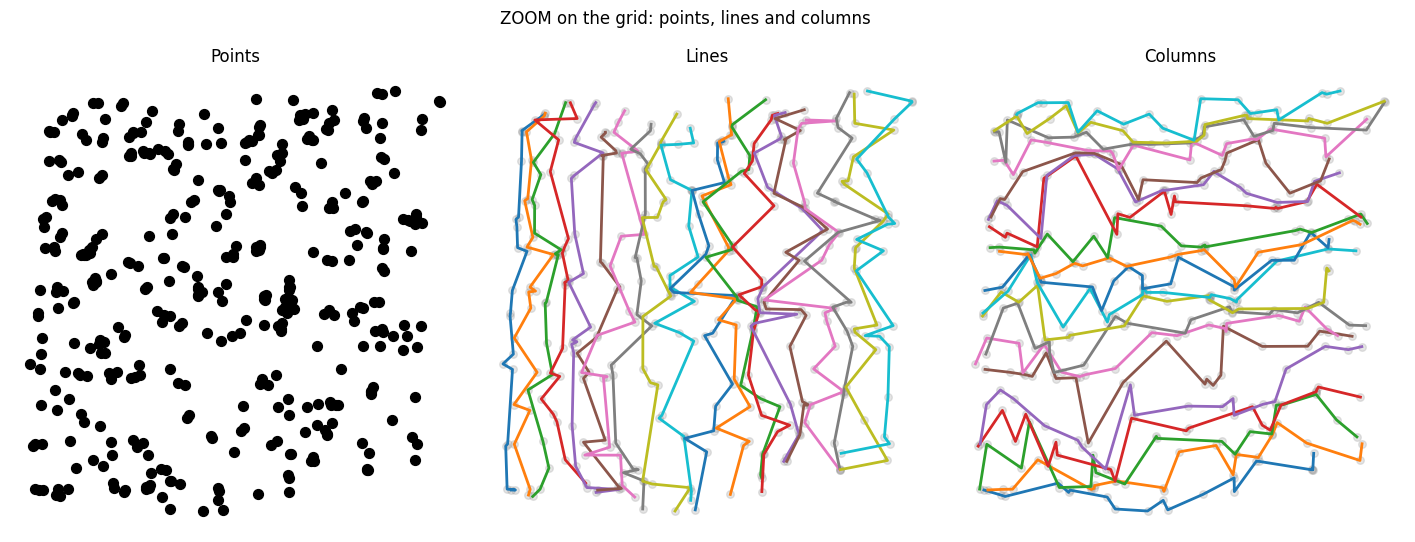
Reorder an unstructured point cloud into a regular grid, so that neighbor-based operations become simple grid processing.
import gridpoints as grid
points = your_dataset_of_points(1000000, 3)  # standard (N, D) array
order = grid.argsort(points, gridshape=(100, 100, 100))  # set gridshape: (I, J, K, ...) = (100, 100, 100)
Pgrid = points[order].reshape(100, 100, 100, 3)  # now an (I, J, K, ...,  D) version of your dataset
# Ready for convolution, neighbor look-ups or geometrical analysis.
# Note that grid.argsort also supports a batch mode (B, N, D) -> (B, I, J, K, ..., D)
Gridpoints supports NumPy, PyTorch and CuPy arrays.
The argsort() reordering is a one-to-one assignment of your points to the cells of a grid with the given gridshape. This is related to Monge optimal transport, but argsort() trades optimality for scalability, by combining greedy axial operations which exploit the specific structure of grids. One million 2D/3D points are sorted in about 0.5 s on a GPU (PyTorch) or 10 s on a CPU (NumPy).
TL;DR
- Problem: point clouds are stored as a flat list
[P1, ..., PN]. Finding the neighbors of a point usually needs a tree or a graph (KD-tree, radius graph…), which is hard to use with standard tensor-based machine learning, especially on GPU. - Idea: assign every point to a cell of a D-dimensional grid, one point per cell, such that the grid is sorted along each of its axes. Then the neighbors of a point are approximately the points in nearby cells, found by plain indexing.
- Payoff: local operations (convolution, smoothing, clustering, interpolation…) that are usually hard to implement on irregular point clouds can be applied on the grid:
points -> grid. To recover the result on the points, one just applies the inverse assignment:grid -> points. - Catch: a plain grid gives approximate neighborhoods (about 99% of true nearest neighbors within a small radius). Exact neighborhoods are recoverable with tiling (see Neighborhood radius). It works best in 2D/3D, and stays reasonable up to about 6D.
The problem
Points are almost always stored in a one-dimensional order. You would like points that are close in space to also be close in memory, so that the nearest neighbor of P[n] is often P[n±1], P[n±2], or a bit further. This is a well-studied problem, and space-filling curves such as the Morton curve are a common solution.
Gridpoints takes a different route. Instead of a 1D order, it gives each point a multi-index [i, j, ...] in a D-dimensional grid. This matters because a grid supports stencil operations (“look at the cells within a few steps in each direction”, [i±di, j±dj, k±dk]).
What Gridpoints does
Input: a point cloud P of shape (N, D) and a target grid shape (I, J, ...).
Output: a permutation order of the indices such that
Pgrid = P[order].reshape(I, J, ..., D)
is a bijection between points and grid cells (one point, one cell), and is sorted along every axis. In 3D, with xyz notation P = (x, y, z):
x[i+1, j, k] >= x[i, j, k]     # x increases along axis 0
y[i, j+1, k] >= y[i, j, k]     # y increases along axis 1
z[i, j, k+1] >= z[i, j, k]     # z increases along axis 2
This property (grid monotonicity) is the only thing guaranteed. See Neighborhood radius for what it does and does not imply.
On Pgrid, a neighbor query becomes a stencil lookup:
neighborhood(Pgrid[i, j, k]) ≈ { Pgrid[i±di, j±dj, k±dk] : (di, dj, dk) within radius R }
where R is a cutoff you choose for your task. Operations built on this run in O(N) on the grid view.
Internal algorithm
To get the main ideas of the sorting algorithm, the core of gridpoints is:
- initialisation: a good starting assignement is important both for quick convergence, and to converge on an assignement with good neighborhood properties. The initialiser build a kdtree on the points, and convert the tree cuts to a grid structure
- iterative 1d sorts: once the initialiser built the starting assignement, gridpoints further optimise it iteratively by looking at 1d slices of the grid (axial slices, but also diagonal ones), and apply standard 1d sort on the points, projected along the direction of the slice.
For interested readers, the full sorting procedure and motivation behind is explained in more details here.
Installation
pip install gridpoints          # core only
pip install gridpoints[demo]    # adds what the demo notebook needs
Full demo: notebook.ipynb
Quickstart
import gridpoints as grid
import numpy as np

N = 1_000_000
A = np.random.rand(N, 3)                       # raw point cloud (NumPy, PyTorch or CuPy)

# 1. Compute the permutation and view the points as a grid
order = grid.argsort(A, gridshape=(100, 100, 100))
Bflat = A[order]                               # sorted, flat (C-order)
Bgrid = Bflat.reshape(100, 100, 100, 3)        # grid view

# 2. Work on the grid
Cgrid = apply_something(Bgrid)                 # e.g. a convolution; shape (100, 100, 100, *)

# 3. Go back to the original point order
Cflat = Cgrid.reshape(N, -1)
orderinv = grid.invert_permutation(order)
C = Cflat[orderinv]                            # back to the original point indexing
apply_something stands for whatever you want to compute on the grid.
gridpoints.sort() is also available.
Choosing the parameters
Grid shape
The grid shape must be roughly tuned to the kind of data, with the constraint that the number of points N has to be factorized as I⋅J⋅K⋅…
- The exact factorization hardly matters:
(18, 20, 16)and(16, 15, 24)behave similarly. - The orders of magnitude of each dimension matter a lot:
(18, 20, 16)and(36, 40, 4)can give substantially different results. - For a thin surface (e.g. an eggshell), use a flat grid such as
(128, 128, 2). A naive(32, 32, 32)grid on the same data produces a poor representation of the geometry.
Padding: if the number of cells I⋅J⋅K⋅… exceeds the number of points N, the point cloud can be padded with special values (see Padding). This lets you sort a prime or variable number of points, and removes the integer-factorization constraint on the grid shape.
Neighborhood radius
There is no theoretical guarantee on the radius R needed for a given task. Nearest neighbors are not guaranteed to land in exactly adjacent cells.
Empirically, in 2D, R = 5 captures about 99% of nearest neighbors. Some outliers might sit further away, mostly on complex geometries with sharp peaks, holes or other non-smooth features.
If you need stricter neighborhoods, or work in higher dimension, there are two options:
- Ensemble of grids: build several grids, each on a rotated or projected view of the points, and combine them (see https://arxiv.org/abs/1505.00880 for the concept of multi view pooling). Projecting the data randomly onto one or several lower-dimensional subspaces before sorting also helps reduce topology-specific effects, since random projections approximately preserve pairwise distances (Johnson–Lindenstrauss lemma).
- Tiling: if you need exact neighbors, tiling gives them. Split the grid into tiles, attach metadata to each tile (e.g. a bounding box), and skip pairs of tiles that are certifiably too far apart for your criterion. The grid does the bulk of the work; the tiles only certify or correct the rest.
Padding with NaN and Inf
NaN and Inf values are supported in a consistent way by the package, so that padding is natural:
NaN→ placed at a random position±Inf→ placed on the border of the grid
This lets you complete the N real points with ΔN fictitious points so that N + ΔN = I⋅J⋅K⋅… , using gridpoints.pad
Performance
Sorting 1 million points (2D/3D), measured on Google Colab:
| Backend | Time |
|---|---|
| NumPy (CPU) | ~10 s |
| PyTorch (T4 GPU) | ~0.5 s |
| CuPy (T4 GPU) | ~1 s (the first, cold call takes ~10 s because of compilation) |
Running stencil operations efficiently
A typical use looks like:
output(i, j, k) = f( Pgrid[i±di, j±dj, k±dk] ) for (di, dj, dk) in a local window
To compute this kind of kernel efficiently, avoid pure Python loops, which are slow. Prefer:
- Native grid convolutions of standard libraries, whenever your operation can be expressed that way.
pystencilsortaichifor complex or non-linear kernels.- On GPU, tiling the grid with a custom
tritonkernel can be particularly efficient.
Limits
Good fit
- Low-dimensional point clouds. 2D and 3D are the sweet spot, with enough points for O(N) grid operations to pay off.
- Pipelines that benefit from regular arrays: GPU processing, convolutions, repeated local operations.
- Nice geometries. “Nice” is deliberately informal. The question is: can you mentally spread your point distribution onto a regular box with the specified dimensions without your brain blowing up in the process? Remarkably, this requires neither convexity (a map of France, a sponge, a donut, an elephant, an eggshell are valid) nor connectedness (clusters and blobs are valid, Gridpoints just glues them together). Examples are in the plots folder.
Poor fit
- High dimension. Arbitrary dimension is supported, but the sweet spot is 2D/3D. Dimensions 4 to 6 are still reasonable. Above ~8D, Gridpoints is generally not appropriate. Note that many powerful dimension reduction technique exists beyond random projections ensemble or principal component analysis. Modern ml tools such as auto-encoders or parametric umap could maybe help to convert high dimensional data to the low dimensional framework of gridpoints.
- Small point clouds. Below a few hundred points, the overhead is not worth it: a naive quadratic implementation of your kernels will be simpler and probably faster.
- Anti-grid geometries. A spider web, a wind turbine… The sort still runs, but a single grid sort gives a poor representation of the structure. For such distributions, you currently need a projection + grid ensemble procedure, which must be set up manually. That may make Gridpoints less attractive if you were looking for a light, out-of-the-box gridification framework. I am working on making this more automatic, and I hope that at some point Gridpoints will be easily applicable to a much wider range of geometries. Updates will be posted here!
Should you use it?
Try it if you process 2D/3D point clouds with local operations and you want regular array layouts (especially on GPU). Approximate neighborhoods work out of the box, and exact ones are available through tiling.
Stay with a KD-tree or a graph method if you work in high dimension or have only a few hundred points. If you need exact nearest neighbors, Gridpoints can still work, via tiling, but expect some extra implementation effort.
A quick way to decide is to run the demo notebook on a sample of your own data and check how much of your true nearest neighbors fall within your radius R.